The short answer
Look up the maker’s torque spec for that fastener, release the handle lock and set the main scale plus the thimble to that number, then lock it. Snug the fastener, hold the wrench at its grip and pull slowly and steadily until it clicks once. Stop there. Store a click wrench as its manual says, usually at its lowest setting.
The steps below are for a click-type (micrometer) wrench. For more hand-tool skills, see our tool-skills guides, and for the tools themselves, the wrenches and sockets section.
Figures here come from tool makers’ manuals and NIST; none is a torque spec for your job.
What you need
- The torque spec. It comes from the maker of the vehicle, bike or part: the owner’s or service manual, or the part’s own instructions. Snap-on says to follow that maker’s directions on torque, pattern or sequence, and lubrication. No general chart replaces it.
- A wrench whose torque range covers the spec. Snap-on: “In general, most mechanical wrenches have a useable range from 20% to 100% of full scale. Most electronic wrenches have a useable range from 10% to 100% of full scale.”
- The right drive size and socket. Check sockets for wear and cracks before you use them, as Snap-on advises.
- Eye protection. Snap-on: “Safety glasses or goggles should be worn at all times when using any hand tool.” OTC’s sheet names the rating: “To prevent personal injury, wear eye protection that meets ANSI Z87.1 and OSHA standards.”
Tekton’s current micrometer line shows how drive size and range pair up:
| Tekton model | Drive | Range | One mark equals |
|---|---|---|---|
| TRQ50402 | 1/4 in. | 20-200 in-lb | 1 in-lb |
| TRQ51402 | 3/8 in. | 10-100 ft-lb | 0.5 ft-lb |
| TRQ52402 | 1/2 in. | 40-200 ft-lb | 1 ft-lb |
| TRQ52403 | 1/2 in. | 40-300 ft-lb | 2 ft-lb |
Tekton rates the accuracy of these at ±3% (its older 24340: ±4%).
How to set a click torque wrench
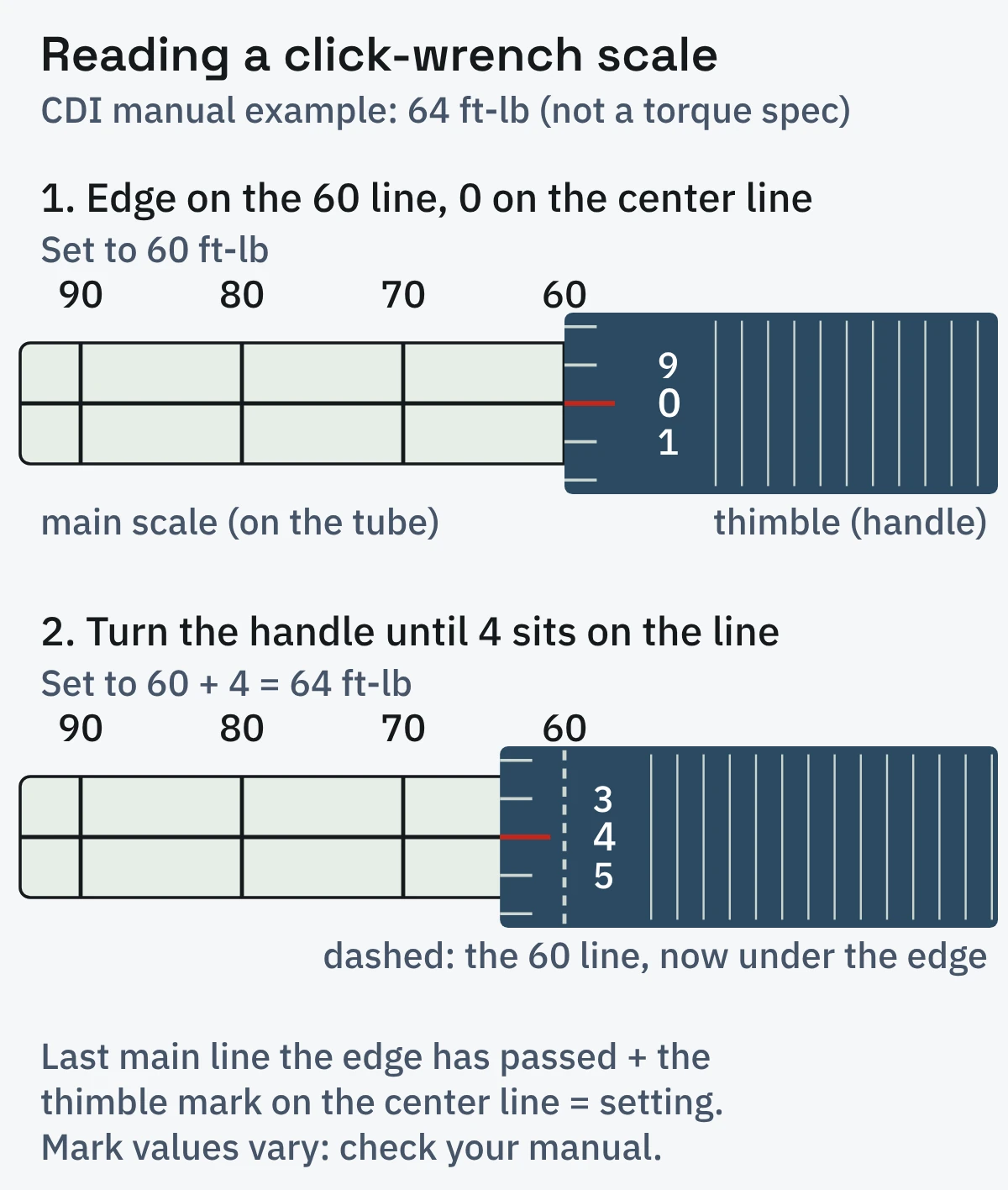
The setting is the main scale line on the tube plus the thimble (micrometer) mark on the handle that sits on the tube’s center line.
Release the handle lock
Makers differ: CDI has you pull a lock ring back, Tekton’s 24340 turns a lock nut counterclockwise, and Tekton’s micrometer models use a collar you pull down. Tekton’s 24340 manual says to tighten and adjust the lock nut and handle by hand only.
Set the main scale
Turn the handle until its edge lines up with the main-scale line just below your number, with the thimble’s 0 on the center line. CDI’s manual has you line up the thimble edge with the “60” graduation cross line and the zero with the vertical line.
Add the thimble marks
Keep turning until the thimble mark you need sits on the center line. CDI’s example: “Turn handle and set thimble graduation to ‘4’ on vertical line. Wrench is now set at 64 ft. lbs.” Check what one mark is worth on yours: on Tekton’s 3/8-inch model in the table above it is 0.5 ft-lb.
Lock it
Re-engage the ring, nut or collar. Tekton notes that “The handle only locks on exact increments”, so a handle that will not lock is sitting between marks.
Foot-pounds, inch-pounds and newton meters
Use the scale in the spec’s own unit when your wrench has one; otherwise convert. NIST’s conversion table gives 1 pound-force foot = 1.355818 N·m and 1 pound-force inch = 0.1129848 N·m.
| To convert | Into | Multiply by | Source |
|---|---|---|---|
| ft-lb | N·m | 1.355818 | NIST |
| in-lb | N·m | 0.1129848 | NIST |
| N·m | ft-lb | 0.7376 | worked from NIST (1 ÷ 1.355818) |
| N·m | in-lb | 8.851 | worked from NIST (1 ÷ 0.1129848) |
| ft-lb | in-lb | 12 | Park Tool |
An example of the arithmetic, not a spec: 10 ft-lb is 120 in-lb, or about 13.6 N·m (10 × 1.355818).
Dual-scale wrenches print N·m on the other side of the tube, but the thimble often still counts in ft-lb steps. Tekton’s 24340 manual shows how it handles this: “every micrometer scale marking equals 1.35 Nm”. In its own example (not a spec), to reach 145.0 N·m you set the main scale to its 135.6 mark and add seven marks (“9.4 Nm ÷ 1.35 ~ 7 micrometer scale markings”). The result is the nearest step, not an exact value.
How to tighten a fastener with it
Start with clean, undamaged threads
Park Tool’s warning applies to any job: “A cross-threaded bolt will not properly tighten even with a torque wrench.” Oiled or dry threads are part of the spec.
Set the ratchet direction
Flip the ratchet lever for the way the fastener tightens, and check that your wrench measures in the direction you need: Tekton’s 24340 says “Torque is measured in clockwise direction only”, so it cannot torque a left-hand thread. When you switch direction on Tekton’s micrometer wrenches, the manual has you set “the torque wrench to its lowest value before setting the target value”.
Run the fastener down first
Snap-on says: “Do not use a torque wrench as the primary means of tightening or loosening fasteners.” Tekton’s 24340 manual lets you ratchet it down with the torque wrench and slow as it gets snug. Either way, the torque wrench does the final tightening.
Hold the grip and pull
Snap-on: “always grasp the torque wrench in the center of the handle.” CDI’s electronic-wrench manual says to “Always pull – do not push – on the wrench handle and adjust your stance to prevent a possible fall while applying torque.”
Pull slowly and steadily
Snap-on: “Apply torque in a slow, methodical manner and avoid sudden, ‘jerking’ movements.”
Stop at the first click
Tekton’s 24340 manual: “At the instant the wrench clicks, torque setting has been reached. Stop pulling wrench and release pressure on handle.” At low settings the click can be faint. Park Tool says the deflection of the head, not the click noise, “indicates that the resistance or torque has been reached”, so watch the head as well as listening.
Follow the tightening sequence
On parts with several fasteners, use the pattern and passes the maker gives. For wheels, follow the vehicle maker’s spec and procedure, and the owner’s manual for lifting the car. The wheel-nut guide on DBA’s European site (run by its official distributor, Ozparts) sets the wrench to the value “indicated in your vehicle’s manual” and has you “Tighten the wheel nuts in a criss-cross pattern using the torque wrench until you hear a click, indicating the desired torque is reached.”
Extensions, adapters and crowfoot wrenches
A straight socket extension is fine. OTC’s dial-wrench instructions say: “Socket extension bars that are in-line with the square drive do not cause error and need no adjustments.” The same sheet says “Do not use universal joints and universal sockets”, because the error is too hard to work out.
A crowfoot or torque adapter is different, and which way it points matters. Tekton’s micrometer manual says a correction is needed for the “change in length caused by the drive tool extending beyond or behind the drive square”, and none when the drive square and fastener sit at a right angle to the handle.
- Pointing straight out ahead of the drive, away from your hand: the wrench gets longer. CDI’s manual gives the formula: TW = TA × L ÷ (L + A), where TW is the wrench setting, TA the torque you want at the fastener, L the distance from the square drive to your hand, and A the length the adapter adds. The setting comes out lower than TA. Example numbers only, not a spec: for 50 ft-lb at the fastener with L = 16 in. and A = 2 in., set 50 × 16 ÷ 18 = about 44.4 ft-lb, rounded to the nearest step your wrench allows.
- Pointing back toward your hand: the wrench gets shorter, which Tekton’s manual shows as “Length Subtracted”. Tekton’s worked example for this case subtracts the length instead: TW = TA × L ÷ (L − A), so the setting comes out higher than TA. Using + A here would leave the fastener under-tightened.
- At a right angle to the handle: no correction, per Tekton.
Never lengthen the handle itself. Snap-on: “Do not use accessories or handle extensions unless specifically allowed by the torque wrench manufacturer.”
Beam, dial and digital torque wrenches
The wrench type changes how you set it and how it tells you to stop, not the rest of the method.
| Type | How it tells you | How to use it |
|---|---|---|
| Beam | A pointer over a scale plate | Pull at 90° to the handle; Park Tool: “Stop tightening when the pointer tip reaches the desired torque value on the scale plate.” |
| Dial | A needle on a dial, often with a memory needle | OTC: “Turn the bezel until the black pointer is resting on zero”, then load slowly until the pointer shows the value. OTC also has you preload it near full capacity before starting or changing direction. |
| Digital | A screen, lights and a buzzer | Set unit and value with the keys; on CDI’s model a green light and buzzer mean within ±4%. |
On OTC’s dial wrench, “If the pointer does not return to zero after a torque application, it is an indication that the wrench was overloaded.”
Using a torque wrench on a bicycle
Bike specs are small and in newton meters, and some bike wrenches set differently: on Park Tool’s, the setting is the number above a red line in a scale window plus the number at the marker on the locking ring. Park Tool’s small click wrench, the TW-5.2, covers 2-14 N·m. A large wrench will not read accurately that low (the 20% rule above).
Take the number from the part. Unior USA’s tech-tips blog (the tool maker’s US arm) says “modern carbon parts (bars, stems, seatposts, frames) carry their own value printed on a sticker near the bolt or molded into the part.” When nothing is printed, Park Tool’s advice is: “Note that some companies do not specify torque for certain components or parts. Contact the manufacturer for the most up to date specifications.”
Storage, care and calibration
Storage: the makers do not agree.
- Snap-on: “If using a click-type torque wrench, always store it at the lowest level on the scale.” Tekton, CDI and Park Tool say the same; Park adds “(not zero)”, and CDI says “Do not force handle below lowest setting.”
- Norbar says winding back is not needed, and that it has production wrenches left at their setting for months without a problem: “Anyone working in torque will have been taught to wind their torque wrench back to zero after every use. However, this is wrong.” If you do wind one back, “if the wrench is wound back at all it should not be adjusted below the minimum scale marking (usually 20% of maximum) never to zero as this can adversely affect the calibration of the wrench”.
- Precision Instruments says every click wrench other than its “C” series “must be returned to the bottom of the scale after use.” Its reason: springs in micrometer-style wrenches “take a set” over time, which it says “will affect the calibration of the wrench”. Its split-beam C series “does not use a coil spring and therefore can be stored at any value.”
Follow your own wrench’s manual.
Care. Wipe it clean; Tekton says “Do not immerse in any type of liquid or cleaner.” Keep it in its case. Snap-on warns that “Dropping a torque wrench on a hard surface can cause the instrument to lose reliable calibration”, so have a dropped wrench checked.
Calibration. Norbar’s 2014 summary of the ISO 6789 standard (2003 edition) says “the default period of use between recalibrations is 5000 cycles or 12 months”, but adds that a workplace’s own procedure takes precedence and that a wrench overloaded by 25% or more should be recalibrated. Snap-on, OTC and Park Tool give the same 5,000 cycles or a year; Precision Instruments asks for “at least every six months”. Calibration is a job for the maker or a calibration service; more guides are in our Know-How section.
Common mistakes
- Using it to break bolts loose. CDI, Tekton and OTC all say not to; CDI: “Do not use torque instrument to break fasteners loose”.
- Clicking again to check. OTC: “Never torque a fastener that is already tightened. First loosen the fastener; then torque it to the desired value.”
Frequently Asked Questions
Q. Do you push or pull a torque wrench?
Pull, as CDI’s manual says, with your stance set in case something slips (step 4).
Q. How many clicks should a torque wrench make?
One; stop and release. Park Tool says of its clicking torque driver: “When the tool clicks, the torque has been reached. There is no need to continue clicking.”
Q. What is the correct torque setting?
The one the maker of the vehicle, bike or part publishes for that fastener, in the owner’s or service manual or printed on the part.
Q. What is 18 ft-lb on a torque wrench?
An example of setting the scale, not a spec for any fastener: on a wrench with main lines every 10 ft-lb and 1 ft-lb thimble marks, it is the 10 line plus 8 marks. It equals 216 in-lb, or about 24.4 N·m (worked from NIST’s factor), and the wrench’s range must cover it.
Sources (13)
- Snap-on, Proper Torque Wrench Use and Maintenance (technical reference)
- CDI Torque Products, dual scale micrometer adjustable torque wrench operation manual
- CDI Torque Products, heavy-duty torque and angle electronic torque wrench operation manual
- Tekton, 24340 torque wrench operator’s manual
- Tekton, micrometer torque wrenches product manual
- Park Tool, Torque Wrench Use and Care
- Park Tool, Torque Specifications and Concepts
- OTC, dial torque wrench operating instructions
- Norbar USA, Torque wrench calibration (on ISO 6789)
- Precision Instruments, FAQ
- NIST, Guide to the SI, Appendix B.9: conversion factors
- DBA (European distributor page), How to correctly tighten wheel nuts
- Unior USA (tool maker’s blog), Bike bolt torque chart: how tight is right