The short answer
Hold the finder flat against the wall and press and hold its button until it finishes calibrating, then slide it slowly sideways without tilting. Mark the stud the way your model signals it: both edges on edge-finding models, the centre on centre-finding ones. Find the same stud higher or lower on the wall before you drill or nail.
Stud finders do not all work the same way. Zircon’s StudSensor e40 marks the two edges of a stud, Stanley’s STHT77587 and STHT77588 (steps here from Stanley’s EU-edition manual) mark its centre in one pass, and a magnetic finder looks for the nails or screws that hold the drywall on. Check which kind you have, then follow the matching steps; where your manual differs from this page, the manual wins.
Electronic models sense density. Zircon says its finders use “a weak electrical field to measure the wall density”, so a stud, which is denser than the drywall in front of it, stands out. This guide does not cover finding or working on wiring. More hand-tool how-tos are in our tool-skills guides.
What you need
- The stud finder and its manual. Models and makers differ, and so do their warnings.
- Fresh batteries. Zircon’s StudSensor e40 takes a 9-volt battery; Stanley’s STHT77587 and STHT77588 take two AAA batteries, which Stanley’s manual says should be new and high quality.
- Painter’s tape and a pencil. Zircon’s tip video says to “Place a strip of masking or painters tape on the wall for you to mark.”
- A tape measure to check spacing between the studs you find.
Three kinds of stud finder
| Kind | What it senses | What it shows you | Where its maker says it struggles |
|---|---|---|---|
| Edge-finding electronic (Zircon StudSensor e40, MultiScanner i520) | Density behind the wall | Each edge of the stud; the i520 also shows the centre | e40: not designed for materials including ceramic floor tile, carpeting, metallic-fibre wallpaper, lath and plaster walls, foil-covered insulation board and glass |
| Centre-finding electronic (Stanley STHT77587, STHT77588) | Density behind the wall | The centre of the stud, found in one pass | Stanley: will not detect objects in concrete, mortar, block, brick work, plaster, carpeting, foil-faced materials, metallic surfaces or ceramic tile |
| Magnetic (Zircon StudScout) | Metal nails and screws | Spots where nails or screws sit in the wall | Zircon: not recommended for lath and plaster |
What the modes on the dial mean
Many electronic finders have more than one mode, and each mode has its own detection depth. Zircon describes its MultiScanner i520 as having four:
| Mode | What Zircon says it does | Depth Zircon lists |
|---|---|---|
| Stud Scan | Locates the centre and edges of wood and metal studs | Up to 3/4 in (19 mm) |
| Stud DeepScan | Locates the centre of wood and metal studs through thicker walls | Up to 1 1/2 in (38 mm) |
| Metal Scan | Detects and locates ferrous (magnetic) metal, and non-ferrous metal | Ferrous up to 3 in (76 mm); non-ferrous up to 1 1/2 in (38 mm) |
| AC Scan | Detects and locates live unshielded AC wires | Up to 2 in (51 mm) |
Zircon’s e40 has two: Stud Scan to 3/4 in (19 mm) and DeepScan to 1 1/2 in (38 mm). Zircon’s tip video puts standard household walls at 5/8 to 3/4 inch of drywall, so Stud Scan covers a typical wall and DeepScan is for thicker ones.
The AC or live-wire indicators on these models are a maker’s extra, not an all-clear; the makers’ warnings are quoted in step 9 below.
How to find a stud with an electronic stud finder
Choose the spot and tape it
Lay a strip of tape across the stretch of wall where you will fasten something, so you can mark on it.
Pick the mode
Start in the standard stud mode. Zircon’s manual for the e40 says to switch to DeepScan if the standard mode cannot find a stud on a particularly thick or dense wall.
Hold it upright, parallel to the studs
Zircon’s e40 manual says: “Hold the tool straight up and down, parallel to the studs, and do not rotate the tool.” Stanley’s troubleshooting says: “Make sure you have placed the stud sensor flat against the wall, the stud sensor is in a vertical position (parallel to a door or window), and you are pressing and holding the center button as you move the stud sensor SLOWLY against the wall.” Zircon’s StudSensor 1 manual adds: “To avoid interference, do not place your free hand within 6 inches of the top of the StudSensor™ tool while scanning.”
Press flat and hold the button to calibrate
Zircon says: “The tool can’t scan for objects behind the wall until it knows what the wall looks like to its sensors.” For the e40, “Do not move the unit until calibration is complete”; its green READY light shows when it is. The i520 beeps after 1-2 seconds and then recalibrates itself as you scan. Stanley’s manual says to hold the button until the LEDs (except the green Power LED) turn off, about 1 second. Start over a bare stretch of wall: Zircon’s StudSensor 1 manual says the tool must start over a part of the wall that is not dense, or it signals an error.
Slide slowly and keep it flat
Keep the button held and move the tool sideways, left or right. Zircon’s e40 manual says not to rock, tilt or press hard while sliding. Zircon’s i520 shows an arrow pointing back toward a stud you started over and moved away from, and Stanley’s direction lights show which way the nearest stud lies.
Mark the first signal
On the e40, when the top red EDGE light is lit, its pointer light shines and a steady tone sounds, “you have located the edge of the stud. Mark this spot.” On a centre-finding Stanley, the centre LED lights when it has found the middle of the stud; Stanley says to stop, release the button and mark through the hole in the tool.
Mark the other edge and find the centre
On an edge-finding model, keep holding the button, carry on past your mark until the EDGE light turns off, then slide back the other way to the second edge and mark that. Zircon says “Middle of stud is centered between the two marks.” Its tip video states the aim: “When finding studs you need to find both edges and center of the stud. Always anchor nails and screws into the center of the stud.” (Double studs are the exception; see step 8.) A centre-finding Stanley gives you that centre mark in one pass.
Confirm it is a stud
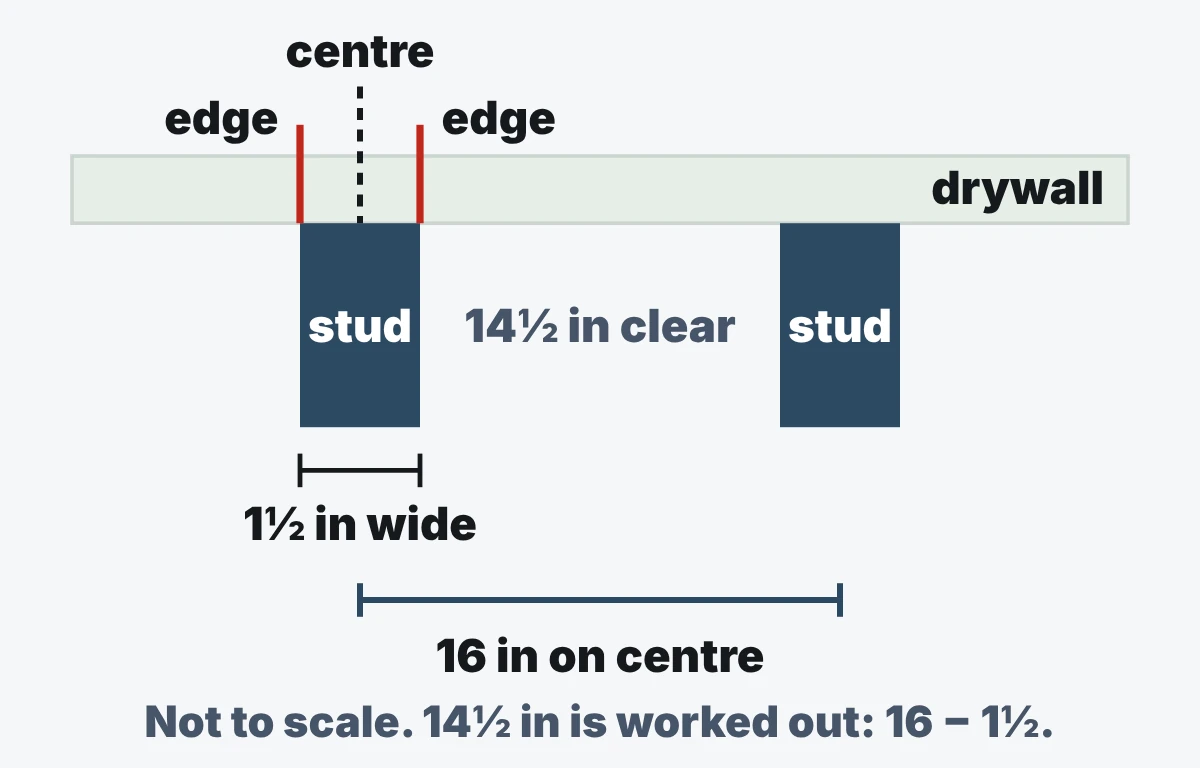
Check the marks against the stud’s size and spacing. Zircon’s e40 manual says studs and joists are 1 1/2 in (38 mm) wide, and that “Anything closer together or a different width may not be a stud, joist, or firebreak.” Then use Zircon’s own confirmation: “Be sure you’ve found a stud by finding other studs equally spaced to either side (16 or so inches apart), and finding the same stud at several places directly above and below the first.” Zircon’s double-and-triple-stud tip says edges 3 or more inches apart, or a centre reading over 1 inch wide, point to a double or triple stud, and there the centre is the wrong place: “If the nail ends up in the gap between the studs it gets almost no support.” Its fix: “In the event of double or triple studs, mark both edges at multiple heights to confirm the location. Then measure ¾ of an inch from the side to find the center of one of the beams.”
Before you drill, nail or screw, read the makers’ warnings
Zircon’s e40 manual says a scanner may detect wiring or pipes in the same way as studs: “Caution should always be used when nailing, cutting, or drilling in walls, floors, and ceilings that may contain these items.” It adds: “Do not rely exclusively on the detector to locate items behind the scanned surface.” Zircon’s e40 and i520 manuals both print this warning: “DO NOT ASSUME THERE ARE NO LIVE ELECTRICAL WIRES IN THE WALL. DO NOT TAKE ACTIONS THAT COULD BE DANGEROUS IF THE WALL CONTAINS A LIVE ELECTRICAL WIRE. ALWAYS TURN OFF THE ELECTRICAL POWER, GAS, AND WATER SUPPLIES BEFORE PENETRATING A SURFACE. FAILURE TO FOLLOW THESE INSTRUCTIONS MAY RESULT IN ELECTRIC SHOCK, FIRE, AND/OR SERIOUS INJURY OR PROPERTY DAMAGE.” Stanley’s manual warns: “Always turn off AC power when working near wiring.” and “Shielded wires or wires in metal conduits, casings, metalized walls, or thick, dense walls may not be detected.” It also says: “The LED or Live Wire Detection symbol on the display is just an indicator and in some situations the voltage detection option may not accurately indicate the presence of voltage in a wall in the event of internal device failure or improper operation, and therefore should not be solely relied upon for identification of the presence of hazardous voltages. Other evidence, such as construction blueprints or visual identification of wiring or conduit entry points should also be utilized. Always follow proper safety practices and use a separate detection method to verify a de-energized condition prior to commencing work.”
How to use a magnetic stud finder
A magnetic finder has no battery and does not sense density. Zircon describes its StudScout as locating “ferrous metal nails, screws, and other surface mounted magnetic materials which may be fastened to wood or metal studs.”
Hold the magnet against the wall and slide it
Zircon says: “Slide StudScout™ across your wall, and its super-strong rare-earth magnet will stick onto nails or screws.” Its maker’s warning goes with that magnet: “Maintain a safe distance of at least 12″ (30 cm) from pacemakers, implantable cardioverter defibrillators (ICDs), and other medical implants.”
Mark each spot where it grabs
The StudScout has an Easy-Mark button; otherwise use your tape and pencil.
Look for a vertical row
Several marks lined up one above another are the row of fasteners the StudScout is made to find. Confirm a row with the checks in step 8 above.
Know when it will not work
Zircon’s bathroom tip says that if the walls are attached with adhesive instead of nails or screws, a metal finder will not help, since there is no metal to find.
How far apart are studs?
Zircon’s e40 manual says that studs or joists “are normally spaced 16 in. (41 cm) or 24 in. (61 cm) apart”. Zircon’s tip video lists a third figure: studs “spaced every 12,16, or 24 inches”. The US Department of Energy, in a framing fact sheet, writes that “In many cases, it is acceptable by code to increase stud spacing from 16 inches to 24 inches on-center.” Which spacing your wall has depends on how it was built, so measure from the stud you found rather than assuming.
“On centre” means measured from the middle of one stud to the middle of the next. Worked out from Zircon’s 1 1/2 in stud width, a 16 in on-centre wall leaves 14 1/2 in (368 mm) of clear space between studs, and a 24 in wall leaves 22 1/2 in (572 mm). That is why edge marks are better evidence than a guess at where the next stud falls.
Why you can’t find a stud
If the finder gives nothing or odd readings, the wall type is a common cause. The makers explain what trips them:
| Wall or situation | Why the finder struggles | What the maker says |
|---|---|---|
| Thick or dense walls, or extra layers | The standard mode cannot reach the stud | Zircon: switch the e40 to DeepScan |
| Plaster over wood lath | Zircon says finders scan for changes in thickness and density, and the plaster keys and laths throw the tool off | Find the lath nails with a metal scanner such as the i520’s metal mode or the MetalliScanner m40 (not the StudScout, which Zircon does not recommend here); “If metal mesh was used, even metal scanners may not find the stud.” |
| Textured or rough surfaces | Zircon’s e40 manual says sensing depth and accuracy can vary with moisture, materials, wall texture and paint | For a textured ceiling of uniform thickness, Zircon says to scan over a thin piece of cardboard; it also suggests cardboard on rough walls so the tool slides smoothly |
| Tile, tub and shower surrounds | Zircon cites multiple layers of varying density; Stanley’s list of what it will not detect includes ceramic tile, and Zircon’s e40 lists ceramic floor tile | Zircon: “Because attaching grab bars to studs is so important you may want to consider consulting a professional.” |
| Exterior walls | Zircon: thicker walls with stucco, siding or brick, and metallic layers such as wire mesh, lead paint and foil-wrapped insulation | Zircon: find the studs from the inside, measure, then plot their locations on the outside |
| Damp or freshly painted walls, metallic wallpaper | The e40 manual lists them as not designed for the tool; fresh paint may take a week or longer to dry | Wait for it to dry and try again |
| Double or triple studs near doors and windows | Zircon: a fastener in the gap between the studs gets almost no support | See step 8: mark both edges at several heights, then measure 3/4 in from the side to find the centre of one beam |
Common mistakes and quick fixes
| What you see | Likely cause (Zircon e40 manual) | Fix |
|---|---|---|
| Lights blink and the unit beeps repeatedly | Scan started over a stud or dense part of the wall; the unit was not flat, or was tilted or lifted; the surface is too dense or too wet for the unit | Turn it off, move over a few inches and start again; keep your hand clear of the scanning area |
| Nothing found in Stud Scan | Wall is particularly thick or dense | Switch to DeepScan |
| Nothing found in DeepScan | You may have calibrated over a stud; DeepScan turns the error signal off because it is twice as sensitive as Stud Scan | Move over a few inches and recalibrate |
Hanging pictures
Heavy or large items belong in a stud. Zircon’s decorating tips say: “Mount heavy, or large items securely to the center of a stud.” So mark the stud’s centre and fasten on that line, unless the marks show a double or triple stud (step 8), where Zircon says to measure 3/4 in in from one edge instead. If the stud is not where the picture needs to hang, the hardware maker’s weight rating is the guide; a stud finder cannot tell you that. More guides on measuring and marking sit in the measuring and layout section, and the wider Know-How section holds the rest of our how-to guides.
Frequently Asked Questions
Q. Why can’t I find a stud with my stud finder?
Usually the wall type or the technique: see the two tables above for each maker’s causes and fixes.
Q. How far apart are studs in drywall?
Zircon says studs are normally 16 or 24 inches apart, and its tip video also mentions 12. Confirm by finding the next stud rather than assuming.
Q. Can I use a stud finder to check for wires?
Some models add a live-AC indicator, but the makers warn against relying on it. Stanley’s manual says: “This tool is not a measuring device and should not be used as a substitute for a voltmeter.” This page does not cover wiring; for electrical work, call a licensed electrician.
Q. Does a magnetic stud finder work on plaster?
Zircon says its StudScout is ideal for use on drywall and not recommended for lath and plaster.
Sources (14)
- Zircon, How to Use a Stud Finder (Tip Minute)
- Zircon, Why You Need to Calibrate your Zircon Stud Finder
- Zircon, StudSensor e40 instructions (PDF)
- Zircon, MultiScanner i520 instructions (PDF)
- Zircon, StudSensor 1 instructions (PDF)
- Stanley, STHT77587 and STHT77588 Stud Sensor manual (EU edition, hosted by Stanley Tools Australia)
- Zircon, StudScout magnetic stud finder product page
- Zircon, Scanning Lath and Plaster Walls
- Zircon, How to Find Studs in Lath and Plaster Walls
- Zircon, Why It’s Difficult to Locate Wall Studs on Exterior Walls
- Zircon, How to Find Wall Studs in Bathrooms
- Zircon, How to Locate Double and Triple Wall Studs
- Zircon, Decorating and Design Tips Do’s and Don’ts
- US Department of Energy, Advanced Wall Framing fact sheet (hosted on energystar.gov)